About Direct Thermal and Thermal Transfer Label Printers
Direct Thermal vs. Thermal Transfer
Once you know what type of thermal printer you need, the next big concern is what print method you'll use. Thermal printers are capable of printing in 2 different ways - direct thermal (DT) and thermal transfer (TT). Depending on how long you need the label to last and the material it's made of, one of the two methods will be more effective for your application.
Direct Thermal
Direct thermal printers utilize heat- sensitive media that blackens as it passes under the printhead. Because they print without a ribbon, direct thermal printers are noted for their simplicity. Direct thermal printed labels typically have a considerable shelf life but are not well suited for environments that expose them to heat, long periods of direct sunlight or abrasion. Because of this, thermal labels, tags or ticket stock are often top coated to resist these elements. Direct thermal printing produces sharp print quality with good scan ability using only one consumable. For any short term labeling application, like shipping labels, direct thermal is the most efficient print method.
Thermal Transfer
Thermal transfer printers use a ribbon, similar to a fax machine, which is melted onto the label by the printhead. This method makes it easy to use label materials beyond paper including synthetic materials, like polypropylene and polyester, for outdoor and harsh environments. Beyond the added durability, thermal transfer printed media also has a very long shelf life making it perfect for product labels, asset tags, and outdoor wristbands. Since you are using a ribbon, you also have the option to change the color of your print beyond just black. With the right combination of labels and ribbon, you can make a label for any environment or application. Though it does cost a little more to print thermal transfer media, the added benefits ensure your label or tag is readable throughout its life without ever needing to reprint. With all the options available for barcode printers today, it can be a challenge to find the right device for your business. Determining the type of printing, overall volume, and what features you need from above will make deciding on a printer easy. If you are still having difficulty or have additional questions, feel free to call we're happy to help you find the right printer for your needs.
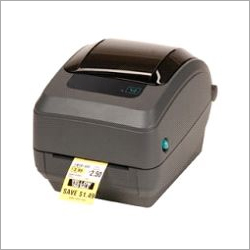
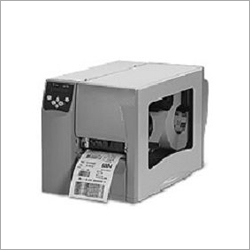
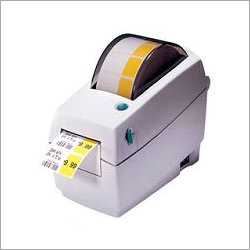
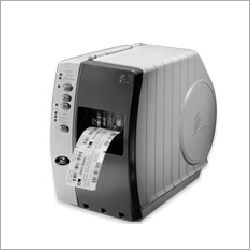
Dual Printing Modes for Versatile ApplicationsSwitch effortlessly between direct thermal and thermal transfer modes to suit a variety of labeling needs. This flexibility makes the printer ideal for shipping, inventory, barcoding, and retail environments in both industrial and commercial settings. Durable materials and dual printing capability ensure consistent results across different types of media.
Intuitive and Robust DesignWith an easy-loading media mechanism and user-friendly interface featuring LED status indicators, this printer enhances productivity. Its robust rectangular build, crafted from ABS plastic and steel, provides durability. The compact size and low power consumption make it suitable for continuous, everyday use, while accommodating up to 127 mm diameter rolls.
Seamless Connectivity and CompatibilityBenefit from multiple connectivity options, including USB 2.0, RS232, and RJ45 LAN, allowing smooth integration with various systems. Emulation support for ZPL, EPL, and DPL makes the printer compatible with a broad range of software and applications, providing reliable operation for manufacturers, suppliers, and wholesalers.
FAQs of Direct Thermal and Thermal Transfer Label Printers:
Q: How do I switch between direct thermal and thermal transfer printing modes?
A: You can select the desired printing mode (direct thermal or thermal transfer) by adjusting the printer settings or via the printers software interface before loading the corresponding media and ribbon (if required for thermal transfer). Refer to the user manual for step-by-step guidance.
Q: What types and sizes of labels can this printer handle?
A: This printer supports continuous, die-cut, black mark, notch, and fan-fold labels, with a minimum label size of 25 mm x 15 mm and a maximum print width of 108 mm. It accommodates rolls with diameters up to 127 mm and can print labels up to 1000 mm in length.
Q: When should I use direct thermal versus thermal transfer printing?
A: Choose direct thermal mode for short-term labels, such as shipping labels, where exposure to heat or sunlight is limited. Opt for thermal transfer when you require durable, long-lasting labels that withstand harsh environments, such as for asset or inventory tracking.
Q: Where can I use this label printer effectively?
A: This printer is ideal for commercial and industrial environments, including shipping departments, retail stores, warehouses, and asset management operations. Its robust design and flexible media handling make it suitable for various applications in India and beyond.
Q: What is the process for loading new labels and ribbons?
A: To load new labels, simply open the printer cover, position the roll or fan-fold labels in the designated area, and follow the guides. For thermal transfer mode, insert the compatible 1-inch core ribbon as indicated. The easy-loading mechanism is designed for quick setup with minimal downtime.
Q: How does this printer benefit my business operations?
A: By combining high-resolution output, durability, and multiple connectivity options, this printer streamlines label production, improves inventory management, and supports precise asset tracking. Its automatic features and fast print speeds can increase overall productivity and accuracy.






 English
 Spanish
 French
 German
 Italian
 Chinese (Simplified)
 Japanese
 Korean
 Arabic
 Portuguese
 Send Inquiry
 Get Latest Price

